
A site admin panel: when you need a custom one, not a generic CMS
A generic CMS is fine for editing content. But when your business runs on orders, bookings, stock or members, you need an admin built around your workflow. Three real examples and how to decide.
A site that just looks good doesn’t run your business. The part that truly matters is the back office — where you control orders, bookings, stock, members, content. That is the admin. And here’s a choice many get wrong: they grab a generic CMS for a job that needs a purpose-built panel.
To be clear: we work with both WordPress and Next.js. For a content site you want to edit yourself, WordPress is a perfectly valid choice. But when your business operates from that panel — not just publishes articles — an admin built around your workflow is a whole other level.
Generic CMS vs. custom admin
A generic CMS is made to edit pages and articles. A custom admin is made for your process: exactly the screens you need, in your team’s terminology, integrated with the systems you already use.
| Generic CMS | Custom admin | |
|---|---|---|
| Good for | content (pages, blog) | operations (orders, bookings, stock) |
| The screens | whatever the platform allows | exactly what you need |
| Integrations | via plugins, limited | anything (ERP, couriers, payments, calendar) |
| Who uses it | fine for an editor | the receptionist, in their steps |
| Ceiling | boxes you in as you grow | scales with you |
Three real admins, built to order
This isn’t theory. Here are three panels we built, each on its own workflow:
NovaFit Reception — a front-desk POS. The desk staff sell memberships and products, check members in (with a QR), manage stock, issue invoices and see reports — all from one panel. No generic CMS does that. Details in the NovaFit Reception case study.
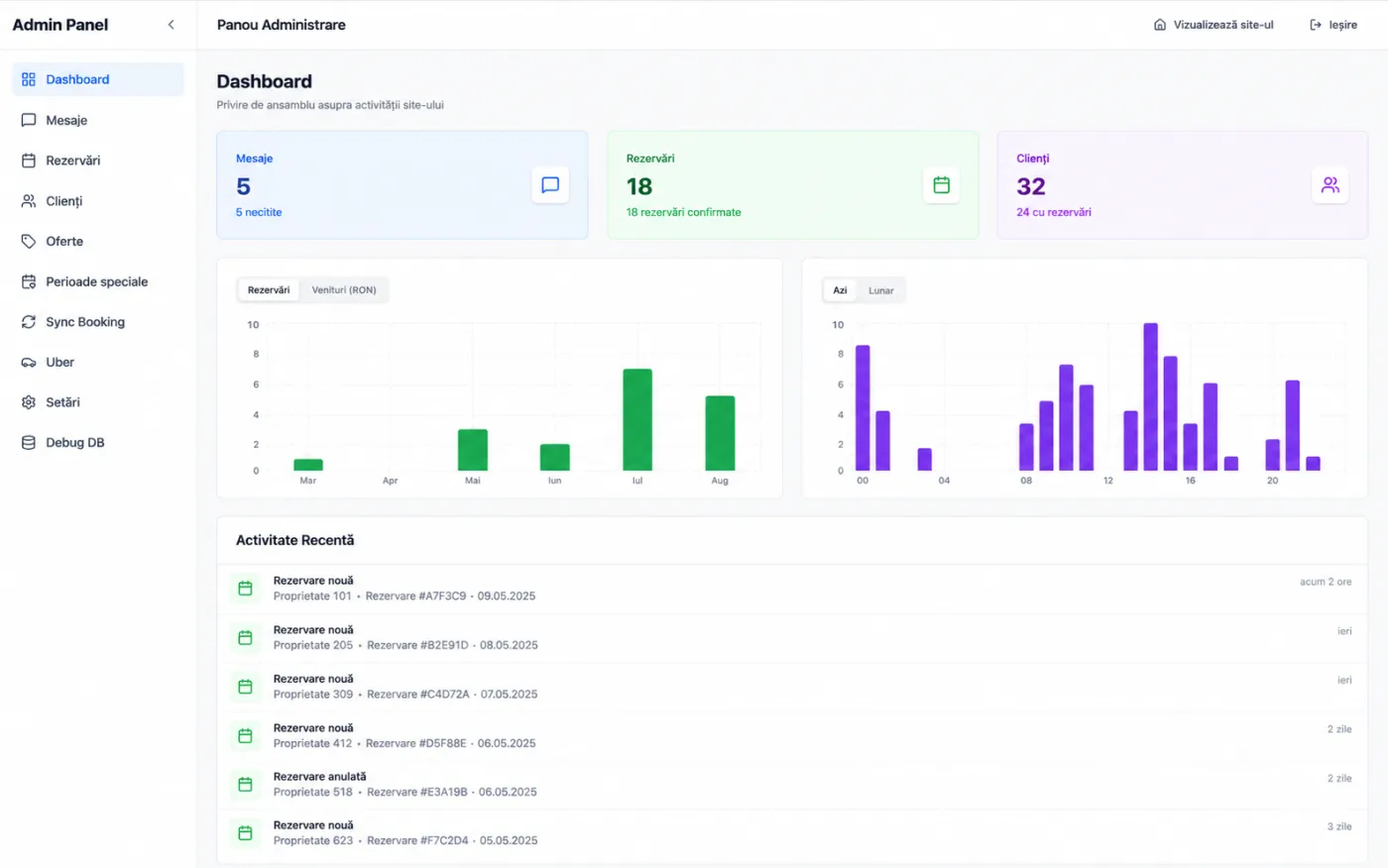
AZAD — a booking dashboard. An admin panel with an overview: confirmed bookings, clients, messages, revenue and hourly charts, booking sync and special pricing periods. See the Azad House project.
Kulttur — a custom product CMS. A catalog with brands and collections, document-by-document image migration, blog, orders, users, GDPR — a full panel for a showroom with thousands of products. See Kulttur.
All three share one thing: they’re built for how the client works, not the other way around.
When a CMS is enough (and when it isn’t)
Honestly: if you have a business site or a blog and just want to change text and images, you don’t need us to build you an admin — a CMS is enough. A business website with simple editing is perfectly fine.
A custom admin is worth it when:
- you have repetitive workflows (sale, check-in, sync, reporting);
- you need real integrations (ERP, payments, couriers, calendar);
- the panel is used by a team, not developers;
- you want what you do manually today to become automations tomorrow.
In short
A generic CMS edits content. A custom admin runs the operation. If your business lives on orders, bookings, stock or members, the back-office panel isn’t a detail — it’s your actual working tool. We build it around your workflow, as part of custom web apps. Tell us what you manage daily and we’ll show you what your admin could look like.